Notes
Atom FeedTimezone Boundaries Mapped
The IANA timezone database contains over 400 timezone entries mostly named
as “<continent>/<city>”. They are meticulously cataloged to group regions of
the world not only by UTC offset but also by the presence and timing of
Daylight Savings as well as current and historical timezone policy changes.
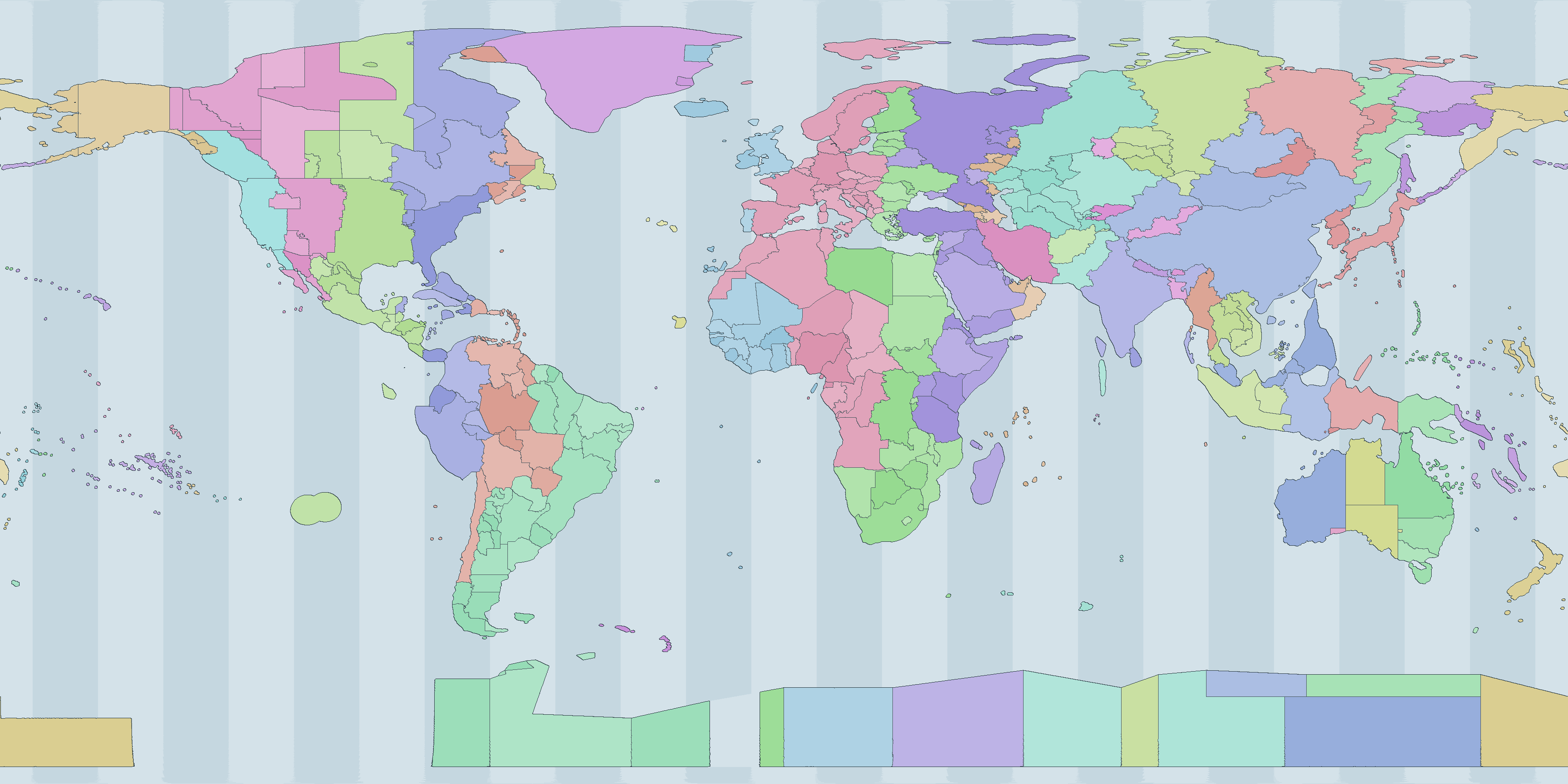
The github.com/albertyw/localtimezone repository maps latitude/longitude data to IANA timezone names. It is based on github.com/evansiroky/timezone-boundary-builder which in term is based on OpenStreetMap. From that data, I generated an Interactive Map:
Comparing WebdriverIO Firefox vs Chrome
Chrome recently started releasing arm64 linux builds which meant that my ubuntu-on-m1-mac can run webdriverio (wdio) builds on both firefox and chrome (it was previously stuck doing only firefox builds).
I therefore compared build speed of codemancer on firefox versus chrome.
wdio.conf.ts Configuration
Firefox:
capabilities: [{
  maxInstances: 5,
  browserName: 'firefox',
  'moz:firefoxOptions': {
    args: ['-headless'],
  },
  acceptInsecureCerts: true,
}],
Chrome:
capabilities: [{
  maxInstances: 5,
  browserName: 'chrome',
  'goog:chromeOptions': {
    args: ['--headless=new', '--no-sandbox', '--disable-dev-shm-usage', '--disable-gpu'],
  },
  acceptInsecureCerts: true,
}],
For Arm architectures, the most recent version of wdio still depends on
@puppeteer/browsers at ^2.2.0 which doesn’t correctly fetch Chrome’s Arm builds.
Therefore, these additional configs need to be added to wdio.conf.ts:
// Set these environment variables to manually-downloaded chrome executables
// For the satantime/puppeteer-node:26-trixie-slim docker images, use
// CHROME_BINARY=/usr/bin/chromium
// CHROMEDRIVER_BINARY=/usr/bin/chromedriver
const chromeBinary = process.env.CHROME_BINARY;
const chromedriverBinary = process.env.CHROMEDRIVER_BINARY;

// inside capabilities
'goog:chromeOptions': {
  args: [/* ... */],
  ...(chromeBinary ? { binary: chromeBinary } : {}),
},
...(chromedriverBinary ? { 'wdio:chromedriverOptions': { binary: chromedriverBinary } } : {}),
Benchmarks
I benchmarked both browsers on codemancer unit tests over 30 iterations.
On Arm64, Chromium 151 against Firefox 155:
browser    runs      min   median     mean      max
chrome       10   4934ms   6593ms   7143ms   10054ms
firefox      10   7055ms  11426ms  17360ms   50600ms
On x86_64, Chromium 152 against Firefox ESR 140:
browser    runs      min   median     mean      max
chrome       10   4433ms   5265ms   6798ms   15222ms
firefox      10   6645ms   9119ms  18613ms   56509ms
References
- WebdriverIO browser runner
- Chrome for Testing availability
- Bringing Chrome to ARM64 Linux Devices
- puppeteer#14258: Installing Chrome with
--platform linux_arminstalls x86-64 binary
Geolocation Precision
Latitude/longitude and other geolocation systems can express a position at exponentially increasing precision as you add digits or levels. Below are tables of the approximate ground precision of several coordinate systems.
One degree of latitude is roughly constant everywhere (~111 km), but one degree of longitude shrinks toward the poles as the meridians converge, scaling with the cosine of the latitude. For the latitude/longitude systems below, the east/west distance is therefore given at several latitudes. Grid systems like H3, S2, Geohash, and Plus Codes are designed to be nearly uniform across the globe, so their precision is instead given as an approximate cell edge length and area.
Degrees with decimals (Degrees)
| Degrees | Decimals | E/W at equator | E/W at 20° N/S | E/W at 45° N/S | E/W at 70° N/S |
|---|---|---|---|---|---|
| 1 | 0 | 111.3 km | 104.6 km | 78.72 km | 38.07 km |
| 0.1 | 1 | 11.13 km | 10.46 km | 7.872 km | 3.807 km |
| 0.01 | 2 | 1.113 km | 1.046 km | 787.2 m | 380.7 m |
| 0.001 | 3 | 111.3 m | 104.6 m | 78.72 m | 38.07 m |
| 0.0001 | 4 | 11.13 m | 10.46 m | 7.872 m | 3.807 m |
| 0.00001 | 5 | 1.113 m | 1.046 m | 78.7 cm | 38.1 cm |
Degrees-minutes-seconds (DMS)
| Precision | Unit | E/W at equator | E/W at 20° N/S | E/W at 45° N/S | E/W at 70° N/S |
|---|---|---|---|---|---|
| 1°00′00″ | degree | 111.3 km | 104.6 km | 78.72 km | 38.07 km |
| 0°01′00″ | arcminute | 1.855 km | 1.743 km | 1.312 km | 634.6 m |
| 0°00′01″ | arcsecond | 30.92 m | 29.06 m | 21.87 m | 10.58 m |
| 0°00′00.1″ | 0.1 arcsecond | 3.092 m | 2.906 m | 2.187 m | 1.058 m |
| 0°00′00.01″ | 0.01 arcsecond | 30.9 cm | 29.1 cm | 21.9 cm | 10.6 cm |
Geohash (base32)
Each geohash character adds 5 bits, alternating between longitude and latitude, so cells are square at odd lengths and 2:1 (wider than tall) at even lengths.
| Length | Cell size (lng × lat) | Ground size at equator |
|---|---|---|
| 1 | 45° × 45° | 5,009 km × 5,009 km |
| 2 | 11.25° × 5.625° | 1,252 km × 626.2 km |
| 3 | 1.406° × 1.406° | 156.5 km × 156.5 km |
| 4 | 0.3516° × 0.1758° | 39.14 km × 19.57 km |
| 5 | 0.04395° × 0.04395° | 4.892 km × 4.892 km |
| 6 | 0.01099° × 0.005493° | 1.223 km × 611.5 m |
| 7 | 0.001373° × 0.001373° | 152.9 m × 152.9 m |
| 8 | 0.0003433° × 0.0001717° | 38.22 m × 19.11 m |
| 9 | 0.00004292° × 0.00004292° | 4.777 m × 4.777 m |
Plus Codes (Open Location Code)
| Code length | Cell size | Ground size at equator |
|---|---|---|
| 2 | 20° | 2,226 km |
| 4 | 1° | 111.3 km |
| 6 | 0.05° | 5.566 km |
| 8 | 0.0025° | 278.3 m |
| 10 | 0.000125° | 13.92 m |
| 11 | 0.000025° | 2.783 m |
| 12 | 0.000005° | 55.7 cm |
H3 hexagonal geospatial indexing
| Resolution | Avg edge length | Avg cell area |
|---|---|---|
| 0 | 1,281 km | 4,357,449 km² |
| 1 | 483 km | 609,788 km² |
| 2 | 183 km | 86,802 km² |
| 3 | 68.98 km | 12,393 km² |
| 4 | 26.07 km | 1,770 km² |
| 5 | 9.854 km | 253 km² |
| 6 | 3.725 km | 36.13 km² |
| 7 | 1.406 km | 5.161 km² |
| 8 | 531.4 m | 0.7373 km² |
| 9 | 200.8 m | 0.1053 km² |
| 10 | 75.86 m | 0.01505 km² |
| 11 | 28.66 m | 2,150 m² |
| 12 | 10.83 m | 307 m² |
| 13 | 4.092 m | 43.9 m² |
| 14 | 1.546 m | 6.27 m² |
| 15 | 58.4 cm | 0.895 m² |
S2
| Level | Avg edge length | Avg cell area |
|---|---|---|
| 0 | 7,842 km | 85,011,012 km² |
| 4 | 490 km | 332,074 km² |
| 8 | 30.63 km | 1,297 km² |
| 10 | 7.658 km | 81.07 km² |
| 12 | 1.915 km | 5.067 km² |
| 16 | 119.7 m | 0.0198 km² |
| 20 | 7.479 m | 77.3 m² |
| 24 | 46.7 cm | 0.302 m² |
| 28 | 2.92 cm | 11.8 cm² |
| 30 | 7.3 mm | 0.737 cm² |
UTM (Universal Transverse Mercator)
UTM projects each of 60 longitudinal zones (each 6° wide) onto a flat grid and expresses a position as an easting/northing in meters within the zone. Because the coordinate is already metric, the precision is simply how many digits of the easting/northing you keep.
| Easting/northing digits | Rounded to | Ground precision |
|---|---|---|
| 550__ | 10 km | 10 km |
| 5502_ | 1 km | 1 km |
| 55020 | 100 m | 100 m |
| 550200 | 10 m | 10 m |
| 5502001 | 1 m | 1 m |
| 5502001.0 | 0.1 m | 10 cm |
MGRS (Military Grid Reference System)
MGRS is a grid-based alphanumeric encoding built on UTM (and UPS at the poles): a grid-zone designator, a 100 km square identifier, then equal numbers of easting and northing digits. Each added digit pair narrows the cell tenfold.
| Digits (per axis) | Example | Ground precision |
|---|---|---|
| 0 | 10SEG | 100 km |
| 1 | 10SEG12 | 10 km |
| 2 | 10SEG1234 | 1 km |
| 3 | 10SEG123456 | 100 m |
| 4 | 10SEG12345678 | 10 m |
| 5 | 10SEG1234567890 | 1 m |
Maidenhead locator system
Used by amateur-radio operators, Maidenhead alternates letter and number pairs (field → square → subsquare → …) to encode longitude and latitude. Cells are 2:1, wider than tall, because longitude spans 360° against latitude’s 180°.
| Characters | Cell size (lng × lat) | Ground size at equator |
|---|---|---|
| 2 (field) | 20° × 10° | 2,226 km × 1,113 km |
| 4 (square) | 2° × 1° | 223 km × 111 km |
| 6 (subsquare) | 5′ × 2.5′ | 9.277 km × 4.638 km |
| 8 (extended) | 30″ × 15″ | 927.7 m × 463.8 m |
| 10 | 1.25″ × 0.625″ | 38.65 m × 19.33 m |
Interpreting Linux Memory Metrics
note
Linux memory accounting is full of metrics that look similar but measure very different things. This post is a short tour of the most useful ones and where they come from.
How Linux Models Memory
Linux gives every process a private virtual address space. Pages in that space may or may not be backed by physical RAM at any given moment - the kernel pages them in on demand and evicts them under pressure. Many pages are also shared between processes (libraries, the page cache, copy-on-write forks), so “how much memory does this process use?” does not have a single right answer. It depends on whether you count what is reserved, what is resident, what is private, and how shared pages are split across processes.
On top of that, the kernel itself uses memory for the page cache, slab allocators, buffers, and reclaimable structures. “Free” memory is rarely the number you actually care about, because the kernel will happily use almost all RAM for cache and return it on demand.
Per-Process Metrics
From /proc/<pid>:
- VSZ (Virtual Size): Total size of the process’s virtual address space, including code, data, mapped files, and unallocated reservations. Pages that are mapped but never touched still count. Useful as an upper bound, not as a usage number.
- RSS (Resident Set Size): Amount of physical RAM currently backing the process’s pages. Shared pages are counted in full for every process that maps them, so summing RSS across processes overcounts system memory.
- PSS (Proportional Set Size): Like RSS, but each shared page is divided by the number of processes sharing it. Summing PSS across all processes approximates total physical memory in use.
- USS (Unique Set Size): Private resident memory only - the portion that would actually be freed if the process exited. The truest measure of a process’s incremental cost.
- WSS (Working Set Size): The set of pages a process actively touches over a given time window. This is the minimum RAM the process needs to run without thrashing. Not a static counter; tools like
wss.plsample idle/young page flags to estimate it. - Swap: Pages that have been pushed out to a swap device. Visible per-process in
/proc/<pid>/status(VmSwap) andsmaps.
System-Wide Metrics
From /proc/meminfo:
- MemTotal / MemFree: Total RAM and the small slice that is completely unused.
MemFreeis almost always misleadingly low on a healthy system. - MemAvailable: Kernel’s estimate of how much memory is available for new allocations without swapping, accounting for reclaimable cache and slab. This is the field to watch.
- Buffers / Cached: Page cache used for block devices and file contents. Reclaimable on demand.
- SwapTotal / SwapFree: Swap device capacity and remaining space.
- Dirty / Writeback: Pages modified in cache that still need to be flushed to disk. Spikes here can stall writes.
Pressure and Reclaim
Raw “used vs free” numbers do not tell you whether the system is struggling. Two further signals do:
- PSI (Pressure Stall Information): Exposed at
/proc/pressure/memoryand per-cgroup atmemory.pressuresince kernel 4.20. Reports the percentage of wall time over 10s/60s/300s windows during which some tasks (some) or all tasks (full) were stalled waiting on memory reclaim. Even small non-zero values indicate the system is doing real work to find memory. pgscan/pgsteal/pgmajfaultin/proc/vmstat: Counters for how aggressively the kernel is scanning the LRU lists, reclaiming pages, and servicing major faults from disk. Rising rates here usually precede visible slowdowns.pswpin/pswpoutin/proc/vmstat: Pages swapped in from and out to disk. Non-zeropswpinmeans the system is paying real disk I/O to bring previously-evicted pages back into RAM - a direct indicator that the working set no longer fits.
When to Use Which
- Capacity planning for a single process: USS for incremental cost, WSS for the RAM it actually needs to run without thrashing.
- Adding up processes to explain total RAM: PSS. RSS double-counts shared libraries; USS undercounts them.
- Sizing a container or cgroup memory limit: WSS plus headroom for the page cache the workload depends on. Setting the limit at RSS is a common cause of surprise OOM kills.
- “Is the box about to OOM?": MemAvailable trending down plus PSI
memory.fullabove zero.MemFreealone will mislead you. - Investigating a slowdown that “has plenty of free memory": PSI,
pgscan,pgmajfault, and Dirty/Writeback. High scan rates with low fault rates mean the kernel is working to keep up; high major-fault rates mean it is losing. - Diagnosing a memory leak in a long-running process: watch RSS and USS over time. Rising USS is a real leak; rising RSS with flat USS is usually shared-library or cache growth.
- Comparing two processes that load the same big library: USS, since RSS will charge each one the full library cost.
- Deciding whether to add swap: SwapFree trending toward zero combined with non-trivial PSI
memory.somemeans the system is already paging under pressure. - Tuning a database or file server: Cached and Buffers should be large - that is the page cache doing its job. Worry when Dirty spikes or Writeback stays elevated.
- Choosing what to alert on in production: MemAvailable, PSI
memory.fullavg60, and swap-in rate (pswpininvmstat). These three together catch nearly every memory-related incident before users do.
Further Reading
- PSI - Pressure Stall Information (kernel.org)
- proc_meminfo(5) man page
- PSI: pressure stall information for CPU, memory, and IO (LWN)
- Brendan Gregg - Working Set Size Estimation
- Understanding Memory Metrics: RSS, VSZ, USS, PSS, and Working Sets (Blackwell Systems)
- Process Memory Management in Linux (Baeldung)
- cgroup v2 and Page Cache (Viacheslav Biriukov)
- Getting Started with PSI (Facebook)
Coordinate to Timezone Lookup Library
Looking up the timezone for a given latitude/longitude coordinate is a common problem in some software domains. There are several databases like timezone-boundary-builder which provide mappings of geo polygons to timezones which are updated with political changes. However, the full GeoJSON file is large and complex. Doing naive “is coordinate-in-polygon” lookups can take milliseconds and require hundreds of megabytes of memory. I created the github.com/albertyw/localtimezone project with the goal of providing lat/lng->timezone lookups with accuracy and microsecond-level responses.
Data Generation
Stage 1: Converting Polygons to H3 Cells
H3 is Uber’s hierarchical hexagonal geospatial indexing system. It divides the world into hexagonal cells at multiple resolutions. At resolution 7, each cell covers about 5.16 square km. This was chosen as a tradeoff between higher resolutions that would slow down performance and lower resolutions that would trade off accuracy.
By using H3, instead of storing and computing polygon geometries, a lat/lng coordinate can be efficiently converted into an H3 cell and the H3 cell can be mapped to a timezone.
GeoJSON Polygons
      │
      ▼
  h3.PolygonToCells(polygon, resolution=7)
      │
      ▼
  Set of H3 cell IDs for each timezone
The conversion of polygons to H3 cells is done in a go generate function and the resulting H3-> timezone mapping is committed into the library. The generator (tzshapefilegen/main.go) downloads the latest timezone GeoJSON release, processes each feature in parallel via goroutines, and collects all the H3 cell IDs for each timezone.
Stage 2: H3 Cell Compaction
A resolution-7 grid of the entire land surface of Earth produces millions of cells. Storing all of them is wasteful, because many neighboring cells belong to the same timezone. H3 provides a compaction operation that exploits its hierarchical structure: when all 7 children of a parent cell all map to the same timezone, they can be replaced by their single parent cell at the next coarser resolution.
Before compaction:        After compaction:
  7 children cells          1 parent cell (resolution 6)
  at resolution 7
  ┌───┬───┬───┐             ┌─────────────┐
  │ A │ A │ A │             │      A      │
  ├───┼───┼───┤      →      │   (parent)  │
  │ A │ A │ A │             └─────────────┘
  ├───┼───┤
  │ A │
  └───┘
(Imagine these are hexagons, not rectangles)
This recursively compresses large homogeneous regions like Asia/Shanghai and Europe/Moscow into much smaller representations. The result is a mixed-resolution set of cells - fine-grained cells near timezone borders, coarser cells in wide uniform regions. In localtimezone, this results in a 97% reduction of cells from H3 compaction (32886K cells to 896K cells).
Stage 3: The Binary Format
To allow the client to read the H3 data fast, H3->timezone data is serialized into a compact custom binary format called H3TZ:
Offset  Size   Field
──────────────────────────────────────────
0       4      Magic: "H3TZ"
4       1      Version (1)
5       1      H3 resolution used
6       2      Number of timezone names (uint16)
8       ...    String table: [uint16 len][bytes] per timezone name
...     4      Cell count (uint32)
...     N×10   Cell entries: [int64 cell ID][uint16 tz index]
The string table stores timezone names once, and each cell entry references a name by its uint16 index. Each cell entry is a fixed 10 bytes.
The cells array is sorted by cell ID before writing. This is critical for the binary search used at query time.
Stage 4: S2 Compression
The raw binary data is then compressed using S2, a high-speed compression algorithm derived from Snappy. S2 is optimized for decompression throughput rather than maximum compression ratio — the entire dataset is decompressed once at client initialization, so decompression speed matters more than final file size. See the previous post about Go Compression Benchmark Results for more information.
Stage 5: Embedding in the Binary
The compressed data file is embedded at compile time:
//go:embed data.h3.s2
var TZData []byte
There is no file I/O at runtime. The timezone data ships inside the Go binary itself. The only cost is binary size and the one-time decompression at startup.
Library Initialization and Lookup
Initialization: Decompression and Indexing
When NewLocalTimeZone() is called, it:
- Decompresses the S2-compressed blob
- Parses the H3TZ binary header and string table
- Bulk-reads all cell entries into two parallel slices:
cells []int64(sorted cell IDs) andtzIdx []uint16(timezone name indices) - Stores the result in an
atomic.Pointer[immutableCache]
S2-compressed bytes  →  decompress  →  parse H3TZ  →  immutableCache
                                                         ├── tzNames []string
                                                         ├── cells   []int64   (sorted)
                                                         └── tzIdx   []uint16
The immutable cache makes the client safe for concurrent access without locks. The atomic.Pointer allows the cache to be replaced atomically if new data is loaded, though in practice the embedded data never changes at runtime.
Client startup takes about 5ms and uses ~17MB of RAM.
Lookup: Binary Search with Multi-Resolution Fallback
A timezone lookup for a (lat, lon) point works like this:
- Convert point to H3 cell at resolution 7
- For each resolution from 7 down to 0: a. Compute the cell at this resolution (cell or its ancestors) b. Binary search in the sorted cells array c. Scan forward to collect all entries with that cell ID (for overlapping zones)
- Fallback: Compute timezone from neighboring H3 cells or based on longitude
Step 2 handles the compacted cells. If a point’s exact resolution-7 cell isn’t in the table, its resolution-6 parent might be (because that whole region was compacted). The lookup scans all resolutions, collecting matches at each level to handle overlapping zones.
The binary search is O(log N) over the sorted cells array. With ~900K cells, this is still only about 20 comparisons. The actual measured response time is around 1 microsecond per lookup.
Benchmark Numbers
BenchmarkGetZone/GetZone_on_large_cities       989595     1205 ns/op
BenchmarkGetZone/GetOneZone_on_large_cities    1000000    1006 ns/op
BenchmarkClientInit/main_client                247        4772720 ns/op   (~5ms)
About a million lookups per second per core, with a ~5ms cold start.
Architecture Summary
The localtimezone library makes use of these tricks to increase speed of initialization and lookup:
- Preprocessing polygon geojsons into H3 for O(log N) cell-based lookups
- Compacting H3 cells to minimize memory usage and reduce binary search space
- Serializing H3 data into a binary format for faster loading
- Compression with S2 for fast decompression
- Binary search over a sorted cell array for fast lookups
By combining these tricks, the library maintains acceptable accuracy (down to 5 square kilometer resolution) while returning timezone values for anywhere in the world in microseconds while using ~17MB of memory.
Permalink